Showing posts with label hysys simulation. Show all posts
Showing posts with label hysys simulation. Show all posts
Friday, May 3, 2013
How to create and acces molar component (molar flowrate, composition, ect)
It has been so long time not to update this blog. And now I'm posting how to access stream component fraction, component molar flowrate and mass flowrate.
Here is the VBA example
Option Explicit
Public hyApp As HYSYS.Application
Public simCase As SimulationCase
Public pStream As ProcessStream
Public Sub StartHYSYS()
Dim filename As String
Dim ITEM As Integer
Dim Compositions As Variant
' HYSYS CUSTOMATION THROUGH EXCEL TO ACCESS STREAM COMPONENTS
' LOADING HYSYS SIMULATION FILE
Set hyApp = CreateObject("HYSYS.Application")
hyApp.Visible = True
Set simCase = hyApp.ActiveDocument
If simCase Is Nothing Then
filename = Worksheets("HYSYS").Range("C4").Text
If filename <> "False" And simCase Is Nothing Then
Set simCase = GetObject(filename, "HYSYS.SimulationCase")
simCase.Visible = True
End If
End If
' READ DATA FROM EXCEL TO "STREAM 1"
Set pStream = simCase.Flowsheet.MaterialStreams.ITEM("STREAM 1")
Compositions = pStream.ComponentMolarFractionValue
For ITEM = 0 To 11 'collect composition data as variant
Compositions(ITEM) = Worksheets("HYSYS").Range("D" & ITEM + 7).Value
Next ITEM
' apply composition data
pStream.ComponentMolarFraction.Values = Compositions
' WRITE COMPOSITION DATA FROM HYSYS TO EXCEL FROM "STREAM 3"
Set pStream = simCase.Flowsheet.MaterialStreams.ITEM("STREAM 3")
For ITEM = 0 To 11 ' number of components are 12
' component molar fraction
Worksheets("HYSYS").Range("E" & ITEM + 7).Value = pStream.ComponentMolarFraction(ITEM)
' component mass flowrate
Worksheets("HYSYS").Range("F" & ITEM + 7).Value = pStream.ComponentMassFlow(ITEM)
' component molar fraction
Worksheets("HYSYS").Range("G" & ITEM + 7).Value = pStream.ComponentMolarFlow(ITEM)
Next ITEM
' FINISH
End Sub
Spreadsheet is look like this figure

Please note, hysys file source is located in Cell C4, refer to following code
filename = Worksheets("HYSYS").Range("C4").Text
Hysys stream is configured as following figure

Hope that helps. Any thought? Please feel free to comment.
Here is the VBA example
Option Explicit
Public hyApp As HYSYS.Application
Public simCase As SimulationCase
Public pStream As ProcessStream
Public Sub StartHYSYS()
Dim filename As String
Dim ITEM As Integer
Dim Compositions As Variant
' HYSYS CUSTOMATION THROUGH EXCEL TO ACCESS STREAM COMPONENTS
' LOADING HYSYS SIMULATION FILE
Set hyApp = CreateObject("HYSYS.Application")
hyApp.Visible = True
Set simCase = hyApp.ActiveDocument
If simCase Is Nothing Then
filename = Worksheets("HYSYS").Range("C4").Text
If filename <> "False" And simCase Is Nothing Then
Set simCase = GetObject(filename, "HYSYS.SimulationCase")
simCase.Visible = True
End If
End If
' READ DATA FROM EXCEL TO "STREAM 1"
Set pStream = simCase.Flowsheet.MaterialStreams.ITEM("STREAM 1")
Compositions = pStream.ComponentMolarFractionValue
For ITEM = 0 To 11 'collect composition data as variant
Compositions(ITEM) = Worksheets("HYSYS").Range("D" & ITEM + 7).Value
Next ITEM
' apply composition data
pStream.ComponentMolarFraction.Values = Compositions
' WRITE COMPOSITION DATA FROM HYSYS TO EXCEL FROM "STREAM 3"
Set pStream = simCase.Flowsheet.MaterialStreams.ITEM("STREAM 3")
For ITEM = 0 To 11 ' number of components are 12
' component molar fraction
Worksheets("HYSYS").Range("E" & ITEM + 7).Value = pStream.ComponentMolarFraction(ITEM)
' component mass flowrate
Worksheets("HYSYS").Range("F" & ITEM + 7).Value = pStream.ComponentMassFlow(ITEM)
' component molar fraction
Worksheets("HYSYS").Range("G" & ITEM + 7).Value = pStream.ComponentMolarFlow(ITEM)
Next ITEM
' FINISH
End Sub
Spreadsheet is look like this figure

Please note, hysys file source is located in Cell C4, refer to following code
filename = Worksheets("HYSYS").Range("C4").Text
Hysys stream is configured as following figure

Hope that helps. Any thought? Please feel free to comment.
Friday, June 10, 2011
Hysys Type Library
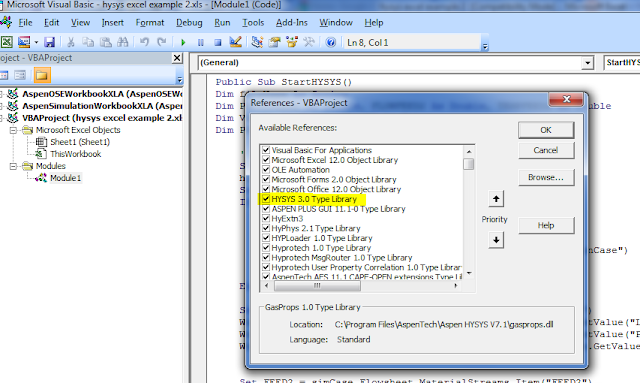
I forgot to mention about this one. Hysys simulation won't run if there is no Hysys Library on Excel. Hysys library can be found and activated through Microsoft Visual Basic - Tools - References. Find Hysys Type Library, activate by check mark and OK.
This blog doesn't contain any tutorial of using Visual Basic Application . You may learn by others literatures, like Visual Basic Application
- Tools - References. Find Hysys Type Library, activate by check mark and OK.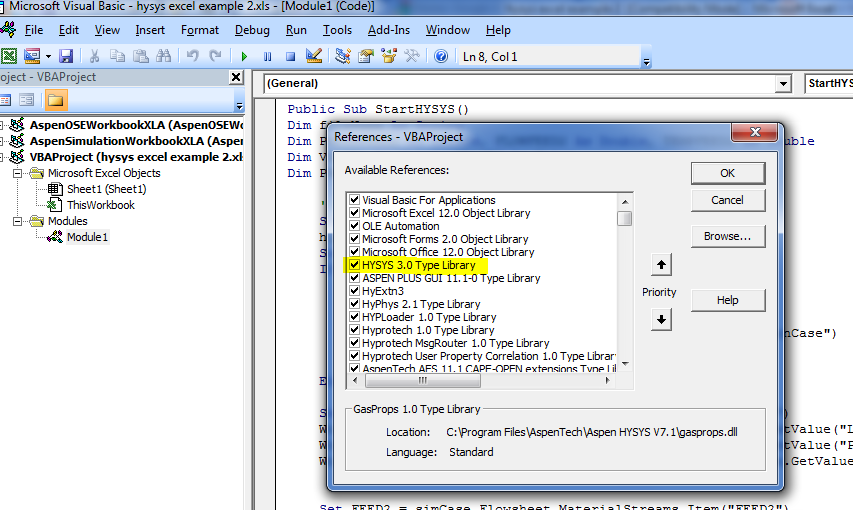
This blog doesn't contain any tutorial of using Visual Basic Application
. You may learn by others literatures, like Visual Basic Application
Subscribe to:
Posts (Atom)

